作者: Mr.Li

  • php set_time_limit()用法测试详解

    在php中set_time_limit函数是用来限制页面执行时间的,如我想把一个php页面的执行时间定义为5秒就可以set_time_limit(5)了。

    一个php脚本通过crontab每5分钟执行一次,考虑到脚本执行时间会超过5分钟,特意用set_time_limit(290)来控制脚本在290秒退出。某天突然发现后台有多个该脚本的进程在执行,也就是说set_time_limit(290)没有起作用。为了证明,特意使用如下代码测试。

     代码如下  

    set_time_limit(5);

    for ($i = 0; $i < 100; $i++) {
        echo date('Y-m-d H:i:s') . "n";
        sleep(1);
    }

    无论是在web还是CLI下,上述脚本并没有在5秒钟后退出。后来加上ini_set(‘max_execution_time’, 5)测试,结果一样。那是不是说明set_time_limit函数根本就没有用呢?其实不然,在 http://stackoverflow.com/questions/5874950/set-max-execution-time-in-php-cli 这里找到根源所在,其实是上面的写法有问题,例如使用下述代码:

     代码如下  

    set_time_limit(5);

    for (;;) {
    }

    执行后,大概5秒钟就可以看到”Fatal error: Maximum execution time of 5 seconds exceeded in”类似这样的错误提示。说明set_time_limit是起作用的。现在在去看看官方文档(http://www.php.net/manual/en/function.set-time-limit.php)上关于此函数的说明,在Note中写到:

    The set_time_limit() function and the configuration directive max_execution_time only affect the execution time of the script itself. Any time spent on activity that happens outside the execution of the script such as system calls using system(), stream operations, database queries, etc. is not included when determining the maximum time that the script has been running. This is not true on Windows where the measured time is real.

     代码如下  
    <?php 
    //set_time_limit(0); 
    $i=1500; 
    include ("inc/conn.php"); 
    while($i>0) 

    $sql="INSERT INTO php (php) 
    VALUES ('$i')"; 
    if ($conn->execute($sql)===flase) 

    //echo "数据插入错误".$conn->errormsg(); 

    else 

    $phpid=$conn->Insert_ID(); 
    echo $i."已经存入数据库,编号:".$phpid; 

    $i–; 
    echo "<hr>"; 

    ?>

    注意:sleep函数暂停的时间也是不计入脚本的执行时间的。所以也是第一个测试失败的原因。

    当你的页面有大量数据时,建议使用set_time_limit()来控制运行时间,默认是30s,所以需要你将执行时间加长点,如 set_time_limit(300)  ,其中将秒数设为0 ,表示持续运行!

    如:set_time_limit(0)表示长时间链接运行!

    注意:这个函数的运行需要你关闭安全模式,在php.ini中将safe_mode = Off 安全模式设置为Off,否则将会出现下面错误:

    Warning: set_time_limit() [function.set-time-limit]: Cannot set time limit in safe mode in

    再次注意的是:

    在php.ini可以通过定义max_execution_time来设置PHP页面的最大执行时间,比如下面:

     代码如下  
    set_time_limit(900);

    这个函数指定了当前所在php脚本的最大执行时间,
    虽然设定值是900秒,实际上
    最大执行时间=php.ini里的max_execution_time数值 - 当前脚本已经执行的时间 + 设定值
    假如php.ini里的max_execution_time=30,当前脚本已经执行10秒,则:
    最大执行时间=30-10+900=920秒。

    php中设置set_time_limit不起作用的解决方法:

    set_time_limit用来设置脚本的超时时间,用法如下:

    set_time_limit(秒数); 
    规定从该句运行时起程序必须在指定秒数内运行结束, 
    超时则程序出错退出. 
    但是有时候设置set_time_limit没有效果,set_time_limit函数最好是在linux下执行,windows执行可能也无效 
    解决方法: 
    修改php.ini里的max_execution_time = 30了。这个默认是30秒,修改为max_execution_time = 300.重新启动apache服务器。这样超时设置为300秒就有提示信息了.
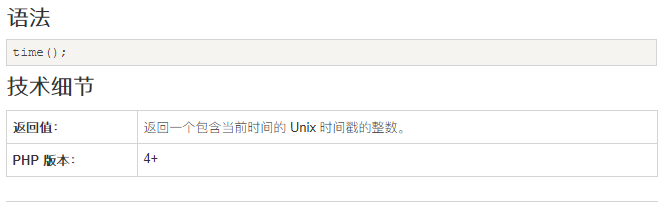
  • PHP time() 函数

    PHP time() 函数

    实例

    返回当前时间的 Unix 时间戳,并格式化为日期:

    <?php
    $t=time();
    echo($t . "<br>");
    echo(date("Y-m-d",$t));
    ?>
    

    运行结果:

    1559145072
    2019-05-29

    定义和用法

    time() 函数返回自 Unix 纪元(January 1 1970 00:00:00 GMT)起的当前时间的秒数。

  • 密码保护:OneinStack 管理FTP账号

    此内容受密码保护。如需查阅,请在下方输入密码。

  • 密码保护:OneinStack MySQL数据库管理

    此内容受密码保护。如需查阅,请在下方输入密码。

  • 密码保护:OneinStack管理虚拟主机

    此内容受密码保护。如需查阅,请在下方输入密码。

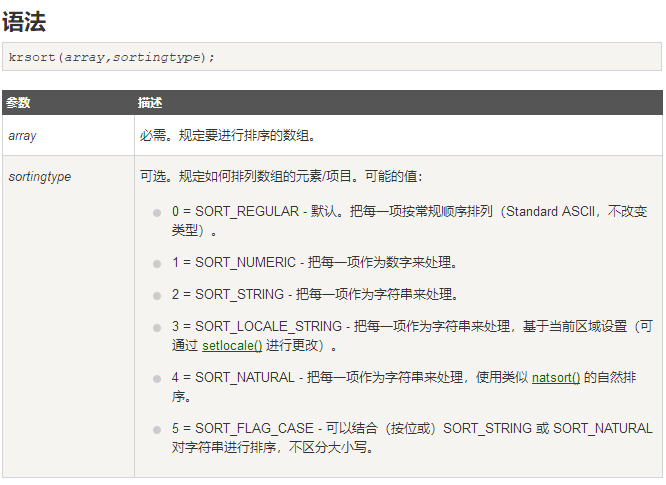
  • PHP krsort() 函数

    PHP krsort() 函数

    实例

    对关联数组按照键名进行降序排序:

    <?php
    $age=array("Peter"=>"35","Ben"=>"37","Joe"=>"43");
    krsort($age);
    ?>
    

    运行结果:

    Key=Peter, Value=35
    Key=Joe, Value=43
    Key=Ben, Value=37

    定义和用法

    krsort() 函数对关联数组按照键名进行降序排序。

    提示:请使用 ksort() 函数对关联数组按照键名进行升序排序。

    提示:请使用 arsort() 函数对关联数组按照键值进行降序排序。

    提示:请使用 asort() 函数对关联数组按照键值进行升序排序。

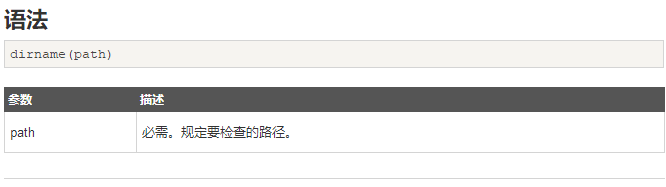
  • PHP dirname() 函数

    PHP dirname() 函数

    实例

    <?php
    echo dirname("c:/testweb/home.php") . "<br />";
    echo dirname("/testweb/home.php");
    ?>
    

    上面的代码将输出:

    c:/testweb
    /testweb

    定义和用法

    dirname() 函数返回路径中的目录名称部分。

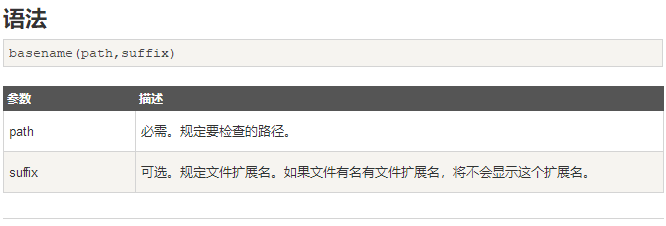
  • PHP basename() 函数

    PHP basename() 函数

    实例

    <?php
    $path = "/testweb/home.php";
    
    //Show filename with file extension
    echo basename($path) ."<br/>";
    
    //Show filename without file extension
    echo basename($path,".php");
    ?>
    

    上面的代码将输出:

    home.php
    home

    定义和用法

    basename() 函数返回路径中的文件名部分。

  • PHP trim() 函数

    PHP trim() 函数

    实例

    移除字符串左侧的字符("Hello" 中的 "He"以及 "World" 中的 "d!"):

    <?php
    $str = "Hello World!";
    echo $str . "<br>";
    echo trim($str,"Hed!");
    ?>


    定义和用法

    trim() 函数移除字符串两侧的空白字符或其他预定义字符。

    相关函数:

    • ltrim() – 移除字符串左侧的空白字符或其他预定义字符。
    • rtrim() – 移除字符串右侧的空白字符或其他预定义字符。

    实例1

    移除字符串两侧的空格:

    <?php
    $str = " Hello World! ";
    echo "Without trim: " . $str;
    echo "<br>";
    echo "With trim: " . trim($str);
    ?>


    上面代码的 HTML 输出如下(查看源代码):

    <!DOCTYPE html>
    <html>
    <body>
    
    Without trim: Hello World! <br>With trim: Hello World!
    </body>
    </html>


    上面代码的浏览器输出如下:

    Without trim: Hello World!
    With trim: Hello World!


    实例2

    移除字符串两侧的换行符(\n):

    <?php
    $str = "nnnHello World!nnn";
    echo "Without trim: " . $str;
    echo "<br>";
    echo "With trim: " . trim($str);
    ?>


    上面代码的 HTML 输出如下(查看源代码):

    <!DOCTYPE html>
    <html>
    <body>
    
    Without trim:
    
    
    Hello World!
    
    
    <br>With trim: Hello World!
    </body>
    </html>


    上面代码的浏览器输出如下:

    Without trim: Hello World!
    With trim: Hello World!


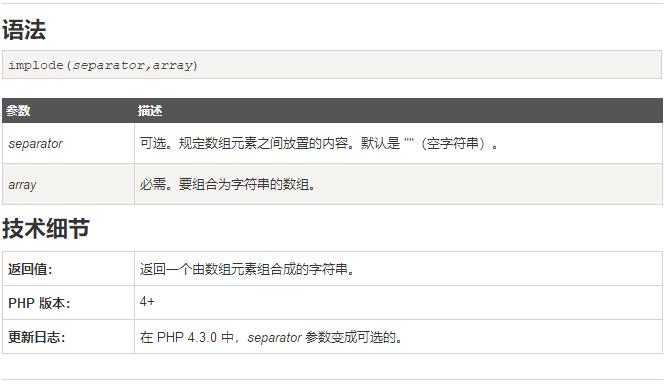
  • PHP implode() 函数

    PHP implode() 函数

    实例

    把数组元素组合为一个字符串:

    <?php
    $arr = array('Hello','World!','Beautiful','Day!');
    echo implode(" ",$arr);
    ?>
    

    定义和用法

    implode() 函数返回一个由数组元素组合成的字符串。

    注释:implode() 函数接受两种参数顺序。但是由于历史原因,explode() 是不行的,您必须保证 separator 参数在 string 参数之前才行。

    注释:implode() 函数的 separator 参数是可选的。但是为了向后兼容,推荐您使用使用两个参数。

    注释:该函数是二进制安全的。

    更多实例

    用不同的字符分离数组元素:

    <?php
    $arr = array('Hello','World!','Beautiful','Day!');
    echo implode(" ",$arr)."<br>";
    echo implode("+",$arr)."<br>";
    echo implode("-",$arr)."<br>"; 
    echo implode("X",$arr);
    ?>